
Skip to content
Nightingale ™
  • About
  • Features
  • Media
  • Community
  • Support
Buy on Steam (opens in a new tab)
  • About
  • Features
  • Media
  • Community
  • Support
  1. Support
  2. How To Articles

Enabling Cheat Mode

Enabling Cheats Mode on Clients

To enable debug/cheats, the client must be launched with the -EnableCheats commandline argument:
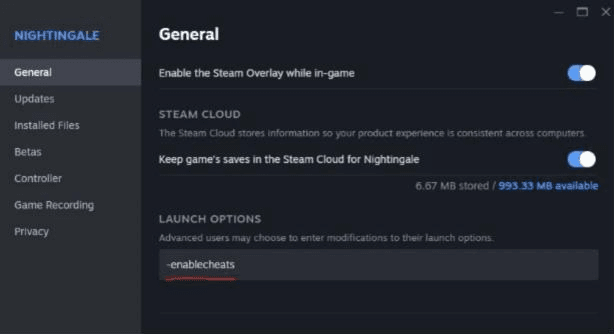
Nightingale's Properties window in Steam, with -enablecheats typed into the Launch Options field.

Once the game is launched, in single player offline mode cheats will always be available through the in game menus, no password required.

If you are hosting a listen server, you also do not need to enter a password to enable debug. Connecting clients will not be able to use debug.

See Dedicated Servers for instructions on enabling cheats on a dedicated server as well as where to set the admin password.

Related articles

  • How to Play with Friends Rent a dedicated server or host a listen server from your PC, then join with Join Code, Steam or IP/LAN.
  • Restore Save Game Nightingale backs up your game data automatically. Here's how to restore a backup manually.
  • Dedicated Servers Install, run and configure the Nightingale Dedicated Server: passwords, players, ports, logs, saves and status.
  • Download Online Characters Download your online characters from the Main Menu to play solo, join a friend or host.
  • Removing Steam Achievements Clear individual Nightingale achievements from the Steam console.
  • Support
  • Website Policies
  • Terms & Conditions
Inflexion Games

© 2026 Inflexion Games™